By the MiamiPermitAI team · August 15, 2026
Why Plan Corrections Delay Permits and How to Fix It

Plan corrections delay permits because they pull your application out of the issuance queue and start a formal resubmittal loop. Your file moves from “under review” to “corrections required,” and when you respond, it goes back to the end of the reviewer queue — not to the front. That queue wait, stacked on top of the time you spend fixing the plans, is where weeks disappear. The single most important first action: the moment you receive a corrections notice, log the response deadline and start building one consolidated response package rather than patching issues piecemeal.
A corrections notice typically contains:
- A list of numbered comments, each tied to a specific plan sheet or document
- Markups or redlines showing exactly where the reviewer found the problem
- Required forms or agency-specific checklists you must include with your resubmittal
- A stated response deadline (commonly before the application risks expiration)
- Instructions for uploading through the jurisdiction’s portal
The operational consequences are immediate. Your application status changes, your timeline shifts, and in some jurisdictions a missed portal instruction or late response can trigger penalty fees or force the application to restart the review clock entirely.
Pro Tip: Before you touch the plans, call the assigned plan examiner for a 10–15 minute conversation. Ask them to confirm what a compliant response looks like for their two or three most critical comments. That call often prevents a second correction round.
Key Takeaways
Plan corrections delay permits because every resubmittal restarts the reviewer queue, and the most effective way to shorten that cycle is to submit a complete, coordinated package the first time.
| Point | Details |
|---|---|
| Corrections restart the queue | Each resubmittal re-enters the reviewer queue, adding weeks per cycle on top of fix time. |
| Top delay drivers | Back-and-forth on applications (46%) and agency workload (41%) are the leading causes per NAM survey data. |
| Respond with one package | A single consolidated response with annotated plans, a change log, and a comment-by-comment letter closes more comments per cycle. |
| Pre-submission checklist | Checking seals, dimensions, zoning, and form completeness before upload eliminates the most common correction triggers. |
| Miamipermitai | Reviews Miami-Dade permit packages before submission, flags correction risks, and tracks permit status through approval. |
Table of Contents
- Why do plan corrections start a new review cycle?
- What are the most common reasons reviewers issue corrections?
- How much time does a corrections cycle actually add?
- How do you respond to a corrections letter without triggering another round?
- A pre-submission checklist that prevents most corrections
- How to track your permit status and escalate without backfiring
- How automated checks reduce correction-induced delays
- The mistake that costs applicants the most time
- Cut your correction risk before you submit
- Where to find authoritative rules and review timelines
- Sources
Why do plan corrections start a new review cycle?
A corrections cycle is not a pause. It is a full loop: the reviewer finishes their pass, marks the file “Corrections Required,” the applicant responds, and the resubmittal enters the queue for a new review. Each leg of that loop takes time, and the queue wait on the resubmittal side is often as long as the original review.
Seattle’s SDCI uses an electronic plan review system that links each comment directly to a specific location on the plan sheet. Once the review cycle completes and the project status shows “Corrections Required,” the applicant can upload a response. SDCI publishes a two-week target review time for corrected plans, but that clock starts only after the resubmittal is accepted — and failure to follow portal instructions can delay acceptance or trigger penalty fees. The agency notifies the primary contact when a review cycle completes, so monitoring portal notifications is not optional.
Common administrative rules that affect timing across jurisdictions:
- The review cycle must complete before the applicant can respond — you cannot upload a partial fix mid-review
- Reviewer assignment and queue order reset on resubmittal, meaning a different reviewer may pick up your file
- Most jurisdictions set a response window, commonly 180 days, after which the application may be considered abandoned
- Some jurisdictions cap the number of allowed resubmittal cycles before requiring a new application and fees
- Penalty fees apply in some systems when applicants upload files outside the portal’s prescribed method
When corrections are returned, the file package typically includes: a markup summary with comment numbers, individual reviewer notes by discipline, required response forms, and any jurisdiction-specific cover sheets. Per LegalClarity’s resubmittal guidance, resubmittal turnaround times vary widely — some jurisdictions match the two-week target, others take as long as the initial review.
Pro Tip: Set up a simple internal tracking sheet the day you receive corrections. Log the comment count, the response deadline, the portal status flag, and every communication with the reviewer. If an expiration dispute arises later, that log is your evidence.
What are the most common reasons reviewers issue corrections?
Most corrections trace back to five categories: incomplete documentation, drawing inconsistencies, code or zoning conflicts, missing professional seals or approvals, and uncoordinated information across disciplines. The LADBS plan-review guidance identifies unclear or missing plan details as a frequent trigger, and each cycle those details produce can add several weeks to the timeline.
| Correction type | What reviewers expect | One-line fix |
|---|---|---|
| Missing north arrow or scale | North arrow and graphic scale on every sheet | Add to all sheets; call out on cover sheet |
| Inconsistent title blocks | Matching project name, address, and date across all sheets | Standardize title block before final export |
| Conflicting dimensions | Dimensions that agree across floor plan, elevations, and sections | Audit all sheets against a single dimension master |
| Absent structural calculations | Stamped calculations matching the structural drawings | Attach sealed calc package; cross-reference sheet numbers |
| Missing energy compliance form | Completed energy compliance form | Attach signed form; reference it on the cover sheet |
| No professional seal | Wet or digital seal from the licensed design professional | Apply seal to all required sheets before upload |
| Unresolved utility conflicts | Utility easements shown and addressed on site plan | Plot easements from the title report onto the site plan |
| Missing agency approvals | Fire, environmental, or HOA sign-off where required | Obtain approvals before submission; attach letters |
Items that most often produce multi-round cycles are conflicting dimensions across sheets, absent structural calculations, and missing inter-agency approvals. These are not quick fixes — they require coordination between the architect, engineer, and sometimes a third-party agency. Reviewers will not close a comment on a conflicting dimension until every affected sheet is corrected and cross-referenced.
Common administrative errors that trigger corrections include: application fields that don’t match the plans, missing easement callouts, incomplete drawing packages, and omitted professional seals. These are fast fixes, but they still cost you a full resubmittal cycle.
Low-cost fixes that eliminate a large share of comments before submission:
- Verify the title block matches on every sheet (project name, address, permit number if assigned)
- Confirm a north arrow appears on every plan view
- Check that all details are labeled and referenced from the plan they appear on
- Attach a complete checklist of required forms as a cover sheet item
- Confirm professional seals are applied to every sheet that requires one
Pro Tip: Read every comment before you fix a single line. Some comments are linked — fixing one without understanding the others can create a new conflict. Build a comment matrix first, then assign fixes.
How much time does a corrections cycle actually add?
A single corrections cycle typically adds weeks to a permit timeline. Multiple cycles stretch schedules into months. The exact delay depends on the jurisdiction’s backlog, the number of comments, the complexity of the fixes, and whether multiple disciplines are involved.
A NAM survey analysis found that back-and-forth to complete applications was cited by 46% of respondents as a top delay driver, while agency workload and queue was cited by 41%. Those two factors alone account for the majority of permitting delays — and they compound each other. A high-backlog agency reviewing a resubmittal that still has unresolved comments produces a second correction cycle, and the queue wait starts again.
46% of permitting delay drivers trace to application back-and-forth; 41% to agency workload and queue — per the NAM survey. Together, they explain why a single unresolved comment can cost months, not days.
| Delay driver | Impact on timeline |
|---|---|
| Application back-and-forth | Cited by 46% of respondents as a top driver |
| Agency workload and queue | Cited by 41% of respondents as a top driver |
| Resubmittal turnaround | Varies: two weeks (best case) to as long as initial review |
| Response window expiration risk | Commonly 180 days; missed deadline can abandon the application |
| Inter-agency coordination | Adds a separate review loop for fire, environmental, or utility agencies |
Secondary timing factors matter too. A discretionary planning or land-use review runs on a different clock than an administrative building permit review — often with public notice periods and hearing schedules that cannot be shortened. Federal overlays like NEPA or ESA add their own review tracks that run independently of the building department. And when a jurisdiction does not publish a guaranteed resubmittal turnaround, the applicant has no contractual basis for escalation.
How do you respond to a corrections letter without triggering another round?
Respond with a single, consolidated package: annotated plans, a change log, and a narrative letter that ties every fix to the specific comment it addresses. A piecemeal response — fixing some comments and leaving others for the next round — almost guarantees another cycle.
Step 1: Map every comment. Read the full corrections letter before touching the plans. Number each comment and note which sheets it affects.
Step 2: Prioritize show-stopper items. Structural, zoning, and life-safety comments will block issuance regardless of everything else. Fix these first.
Step 3: Coordinate discipline leads. If the corrections span architecture, structural, mechanical, and civil, assign each comment to the responsible discipline and set an internal deadline for their response. Uncoordinated fixes create new cross-sheet conflicts.
Step 4: Create a redlined plan set. Mark every change on the plans with a revision cloud and delta number. Reviewers should be able to find your fix without hunting for it.
Step 5: Write a response letter. For each comment, state what was changed, which sheet it appears on, and the code section or standard that supports the resolution. A table format works well here:
| Comment ID | Change made | Sheet reference | Code citation |
|---|---|---|---|
| C | Added north arrow to all plan views | A2, A3 | Local ordinance §X |
| C | Revised footing dimensions to match structural | A2, S | IBC code section |
Step 6: Run a final QA pass. Have someone who did not make the corrections review the response package against the original comment list. Missing one comment is enough to trigger another cycle.

Step 7: Submit before the expiration date. Per LegalClarity’s resubmittal guidance, the response window is commonly 180 days. Missing it can abandon the application entirely.
For contested or unclear comments, call the reviewer before resubmitting. If the comment is ambiguous, a short clarification call is faster than a written code argument. If you disagree with a comment, submit a written justification that cites the specific code section and explains why your design complies. Reviewers respond better to a clear code reference than to a general objection.
Pro Tip: Format your response letter as a table with four columns: comment ID, what was changed, sheet reference, and code citation. Reviewers can verify your fix in seconds instead of hunting through the plans.
A pre-submission checklist that prevents most corrections
Run this checklist before you upload. It targets the errors that produce the highest volume of corrections across jurisdictions — the kind that Moment Engineering’s practitioner guide identifies as preventable with a short internal QA pass.
Document completeness
- Sealed structural calculations attached and cross-referenced to structural sheets
- Energy compliance form completed, signed, and attached
- All required agency approvals obtained (fire, environmental, HOA, historic)
- Application fields match the plans (project address, scope, valuation)
- Correct fees submitted; fee calculation matches the project valuation
Drawing consistency
- North arrow on every plan view sheet
- Graphic scale on every sheet
- Title block consistent across all sheets (project name, address, date, sheet number)
- All dimensions verified to agree across floor plan, elevations, and sections
- All details labeled and referenced from the plan they appear on
- Revision clouds and delta numbers on any sheets revised from a prior submittal
Zoning and site
- Setbacks confirmed against the current zoning map and overlay districts
- Easements plotted from the title report onto the site plan
- Flood zone designation confirmed; elevation certificate attached if required
- Utility conflicts identified and addressed on the site plan
Professional seals and signatures
- Architect’s seal on all architectural sheets requiring it
- Engineer’s seal on all structural, civil, and MEP sheets requiring it
- Contractor license number verified and listed on the application
Portal and submission
- Files named per the portal’s naming convention
- File sizes within portal limits
- All required forms uploaded as separate attachments, not embedded in the plan set
- Submission confirmation email saved
A pre-application meeting is worth requesting when your project involves a discretionary review, an unusual zoning overlay, or a scope that crosses multiple departments. The time invested in a pre-app is a small fraction of the delay it prevents. Some states also allow third-party plan review to bypass departmental queues when staff capacity is the bottleneck — check whether your jurisdiction offers this option.
Pro Tip: Require a sign-off from the project architect, engineer of record, and the permit coordinator before the package uploads. Use a simple sign-off sheet with each person’s initials next to their discipline’s items. A file-naming convention like “ProjectName_PermitType_SheetNumber_Rev0” reduces reviewer confusion and portal rejection.
How to track your permit status and escalate without backfiring
Use the jurisdiction portal’s status flags and the assigned reviewer’s contact information as your primary tracking instruments. Escalate only after you have documented wait times that exceed the jurisdiction’s published targets.
Practical tracking steps:
- Set calendar reminders for the response deadline and the 30-day and 60-day marks before expiration
- Check the portal status flag daily once a resubmittal is in queue (common flags: “Under Review,” “Corrections Required,” “Approved,” “On Hold”)
- Keep a submission log with dates: original submission, corrections received, resubmittal date, and every communication with the reviewer
- Save every portal notification email; they establish the official timeline if a dispute arises
- Note the assigned reviewer’s name and contact at the time of each review cycle — reviewer assignments can change
Safe escalation paths, in order:
- Clarification call with the assigned reviewer. Ask a specific question, not a general “what’s the status” inquiry. Reviewers respond better to targeted questions.
- Supervisor or lead plan examiner request. Appropriate when a published turnaround target has passed and the portal shows no activity. Frame it as a timeline question, not a complaint.
- Formal expedite request. Many jurisdictions allow a paid expedite for projects with documented schedule urgency. Check the fee schedule and eligibility criteria before requesting.
Escalation can backfire when it is premature or adversarial. Calling a supervisor before the published turnaround window has passed, or submitting a complaint that implies reviewer error without evidence, can create friction that slows the file rather than moving it. Per SDCI’s guidance, agencies notify the primary contact when a review cycle completes — if you are not receiving notifications, check your portal contact settings before escalating.
When you do escalate, include: the permit number, a concise timeline of submissions and responses, links to the submitted response package in the portal, and a clear explanation of why an expedite is justified (safety issue, critical infrastructure, documented contractor schedule).
How automated checks reduce correction-induced delays
Automated permit-readiness checks reduce avoidable corrections by catching label errors, missing forms, zoning conflicts, and cross-sheet inconsistencies before the file ever reaches a reviewer. The fixes that automated tools catch are exactly the ones that produce the fastest, most frustrating correction cycles — the north arrow that was deleted in the final export, the seal that didn’t transfer to the PDF, the setback that was measured from the wrong property line.
Concrete ways automation helps:
- Consistency checks across sheets: flags dimension conflicts, mismatched title blocks, and missing callouts that a human reviewer scanning dozens of sheets might catch on the second pass
- Zoning overlay verification: cross-references the project address against current zoning maps, setback tables, and overlay districts
- Form completeness verification: confirms required forms are present, signed, and attached as separate files
- Seal and signature detection: identifies sheets that require a professional seal and flags any that are missing one
- Ordered fix list: prioritizes corrections by severity so the design team addresses show-stoppers first
Miamipermitai applies this approach specifically for Miami-Dade County, grounding every check in Miami 21 zoning data, FEMA flood zone designations, folio property records, and Florida DBPR contractor license verification. The platform produces a readiness score and a plain-language fix list before submission, then tracks the permit through approval using public Miami-Dade records. For contractors and owners submitting in Miami-Dade, that pre-submission check catches the category of errors that the LADBS guidance identifies as the most common correction triggers.
Pro Tip: Use an automated check as the first pass, then run a short human QA review focused on the items the tool flagged as medium-risk. That combination catches both the systematic errors automation finds reliably and the judgment calls that still need a trained eye.
The mistake that costs applicants the most time
The most common fatal mistake in a resubmittal is treating it as a patch rather than a coordinated, cross-discipline fix. An architect corrects the floor plan, the structural engineer updates the footing schedule, and nobody checks whether those two changes now conflict on the section detail. The reviewer finds the new conflict, issues another correction, and the clock resets.
Three patterns show up repeatedly. First, piecemeal fixes: each discipline responds to their own comments without a cross-check, so the resubmittal resolves individual comments but introduces new inconsistencies. Second, missing cross-references: a detail gets corrected on one sheet but the callout on the plan view still points to the old detail number. The reviewer cannot verify the fix without hunting, and some will simply re-flag it. Third, not confirming the reviewer’s expectation before resubmitting: a comment that seems clear in writing often has a specific format or documentation standard the reviewer expects. Submitting a technically correct response in the wrong format can produce another comment.
The single habit that saves the most time is this: compile a change log and an annotated plan set, and require a cross-discipline sign-off before the package uploads. Every discipline lead reviews the full comment matrix, not just their own items, and signs off that their fixes do not conflict with anyone else’s. That one step eliminates the majority of second-round corrections.
Cut your correction risk before you submit
Catching a missing seal or a zoning conflict after a reviewer flags it costs you a full resubmittal cycle. Catching it the afternoon before you upload costs you nothing.
Miamipermitai reviews your permit package against Miami-Dade’s actual requirements before you submit to the county. The platform checks:
- Document completeness (required forms, sealed calculations, contractor license)
- Miami 21 zoning overlays and setback compliance
- FEMA flood zone designation and elevation certificate requirements
- Florida DBPR contractor license verification
- Cross-sheet consistency and plan labeling
- A readiness score with a prioritized fix list in plain language
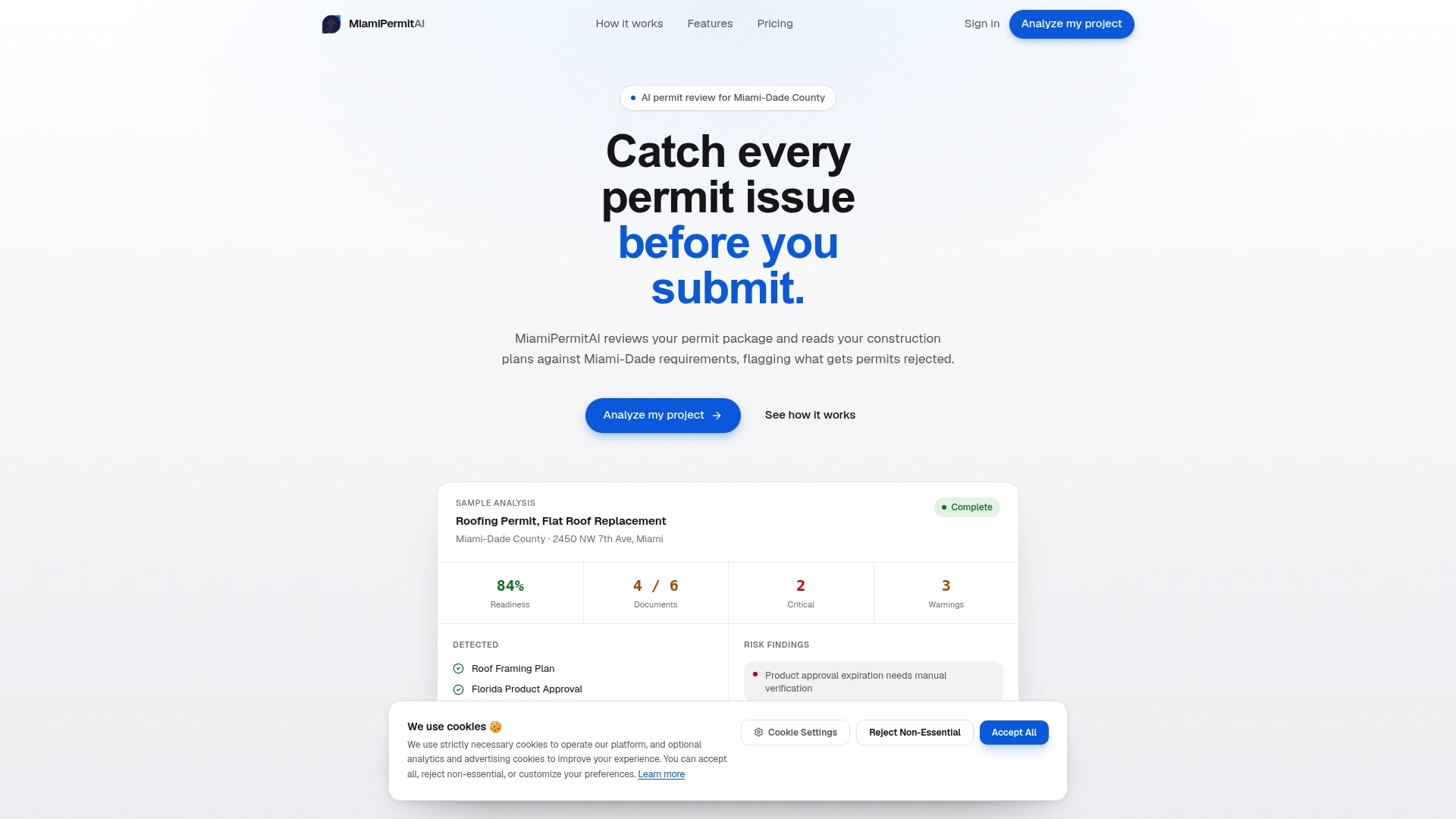
After you submit to the county, Miamipermitai tracks your permit through approval using public Miami-Dade records and sends you status updates by email — so you know the moment the status changes without checking the portal manually.
Check your permit package before you submit and get a readiness report that shows exactly what to fix.
Where to find authoritative rules and review timelines
The most useful sources are your local building department’s plan review page, your state’s statutes on resubmittal windows and third-party review, and national studies that quantify delay drivers.
For each source type, here is what to look for:
- Local building department portal: published target review times, resubmittal instructions, portal status flag definitions, expedite procedures, and fee schedules. Seattle’s SDCI and Los Angeles’s LADBS both publish these publicly and are useful benchmarks even if you are submitting elsewhere.
- State statutes and guidance: resubmittal deadlines, restart-the-clock rules, and whether third-party plan review is available in your state. LegalClarity’s resubmittal overview covers the mechanics that apply across many jurisdictions.
- National permitting research: the NAM “America on Hold” report quantifies delay drivers and makes the case for reducing iterative back-and-forth.
- Practitioner guides: Moment Engineering’s plan check corrections guide covers common issues and the value of pre-application meetings.
- Permit-readiness tools: for Miami-Dade submissions, Miamipermitai provides a pre-submission readiness check grounded in local data, plus post-submission status tracking.
For jurisdiction-specific rules, always go to the primary source — the building department’s own published guidance — rather than relying on third-party summaries, which may not reflect recent procedural changes.
Sources
- Seattle
- Dbs
- AMERICA ON HOLD
- Plan Check Corrections: Common Issues and How to Avoid Them | Moment Engineering
- Plan Resubmittal: Process, Fees, and Review Timelines - LegalClarity
Recommended
Is your permit package ready?
Run an AI readiness check against Miami-Dade requirements before you submit.
Start your first projectThis article is general guidance and not legal, engineering, or official county advice. Always verify requirements with Miami-Dade County before submitting a permit.