By the MiamiPermitAI team · August 28, 2026 · Updated September 30, 2026
Solar Permit Miami-Dade: A Homeowner and Contractor Guide
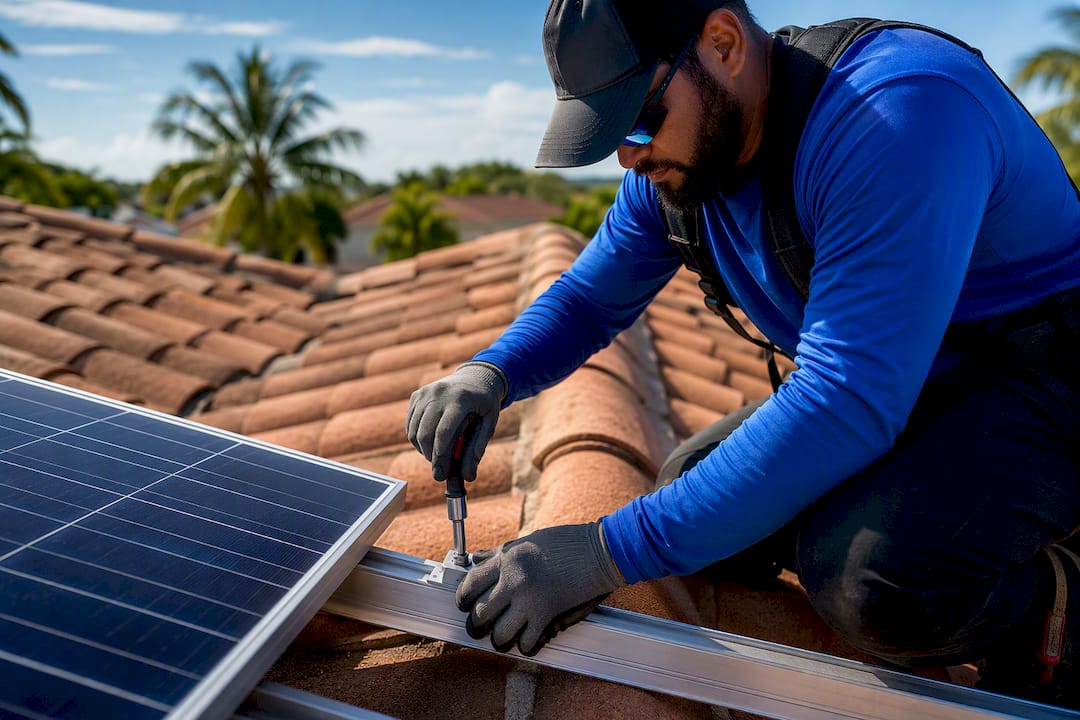
A residential solar installation in Miami-Dade County needs an Electrical (Category 34) permit, plus structural documentation proving compliance with the Florida Building Code and High Velocity Hurricane Zone rules. You submit a complete, digitally signed plan set through the county’s electronic portal or the City of Miami’s ePlan system, so pre-assembling sealed structural drawings, the notarized building application, and the electrical fee sheet before you open a portal account is the single move that saves the most time.
TL;DR:
- Using the correct Category 34 fee code (G137 when you use the county’s prescribed solar mounted system and pre-approved flashing detail) and submitting digitally sealed plans are critical to avoid delays or outright rejection.
- Pre-approved flashing details and accurate wind-uplift calculations based on actual roof zones significantly speed up structural review times.
- Verification of contractor licensing through the Florida DBPR is essential before application submission, especially for city projects.
- Properly notarized and signed applications, including owner and contractor info matching the folio record, prevent common administrative rejections.
- Final permit activation requires paying all fees and posting the permit card at the site before scheduling inspections.
Table of Contents
- What Is the Solar Permit Application Process in Miami-Dade?
- What Documents Do You Need for a Solar Permit in Miami-Dade?
- Why Do HVHZ Rules Matter for Solar Permits?
- How Do You Submit Solar Plans Electronically in Miami-Dade?
- Common Reasons Solar Permits Get Delayed in Miami-Dade
- What Inspections Happen After the Permit Is Issued?
- What Are Typical Timelines and Fees for a Miami-Dade Solar Permit?
- Are There Zoning Restrictions on Solar Panels in Miami-Dade?
- What Compliance and Maintenance Rules Apply After the Permit Closes?
- Common Problems in Miami-Dade Solar Permit Packages
- Cut Rejection Risk Before You Submit to Miami-Dade
- Official Resources for Miami-Dade Solar Permits
- Sources
What Is the Solar Permit Application Process in Miami-Dade?
Getting a solar permit miami-dade approved comes down to sequence. Skip a step, and you’re not just delayed. You’re often bounced back to the start of the review queue.
1. Confirm your jurisdiction and contractor licensing first. Unincorporated Miami-Dade County and the City of Miami run separate systems, and mixing up which one governs your address is a common first mistake. If you’re inside city limits, the City of Miami requires a licensed Electrical Contractor (EC) or Certified/Registered Contractor (CVC) to pull the permit, and encourages homeowners to verify that license before signing a contract. Miami-Dade County projects route through the county’s own system instead. Either way, verify the installer’s license status through the Florida DBPR database before you sign anything.
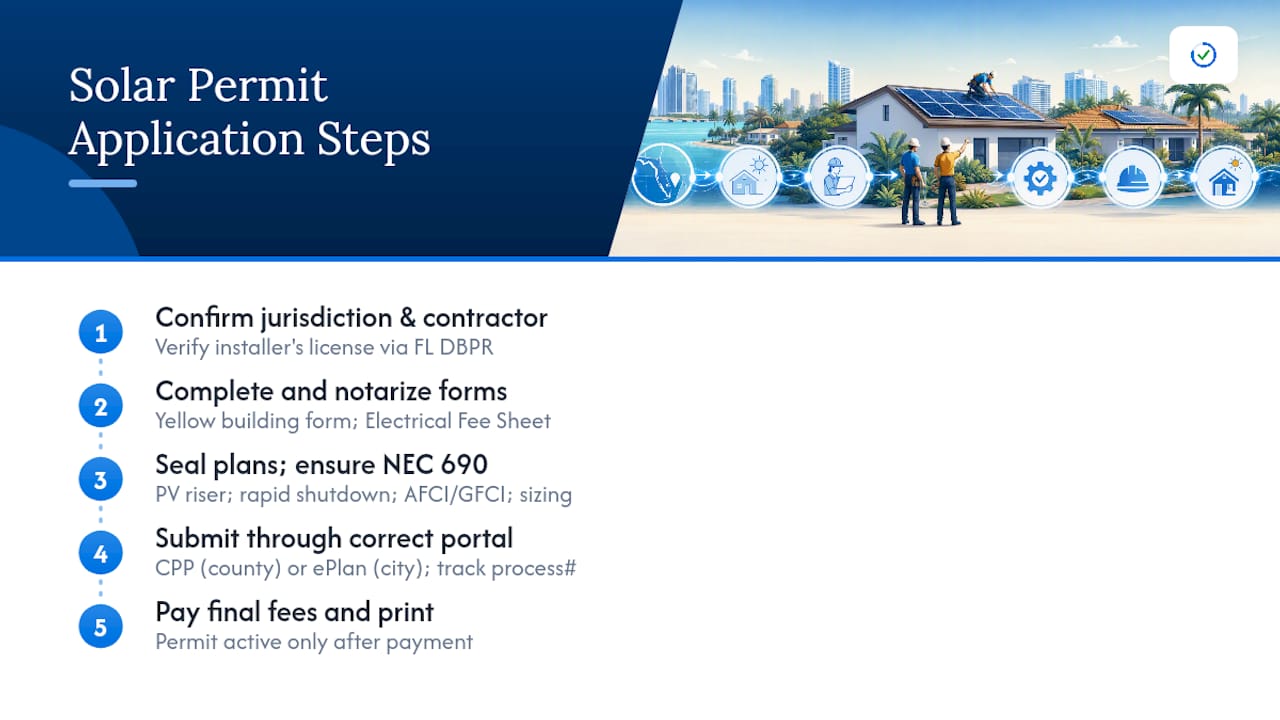
2. Complete and notarize the paperwork. Two forms anchor every application: the building permit application (often called the yellow form) and the Electrical Fee Sheet, where you select Category 34 for solar. Both need a signature, and the building application typically needs notarization. This is where homeowners lose days waiting on a notary appointment they didn’t know they needed until the county rejected the upload.
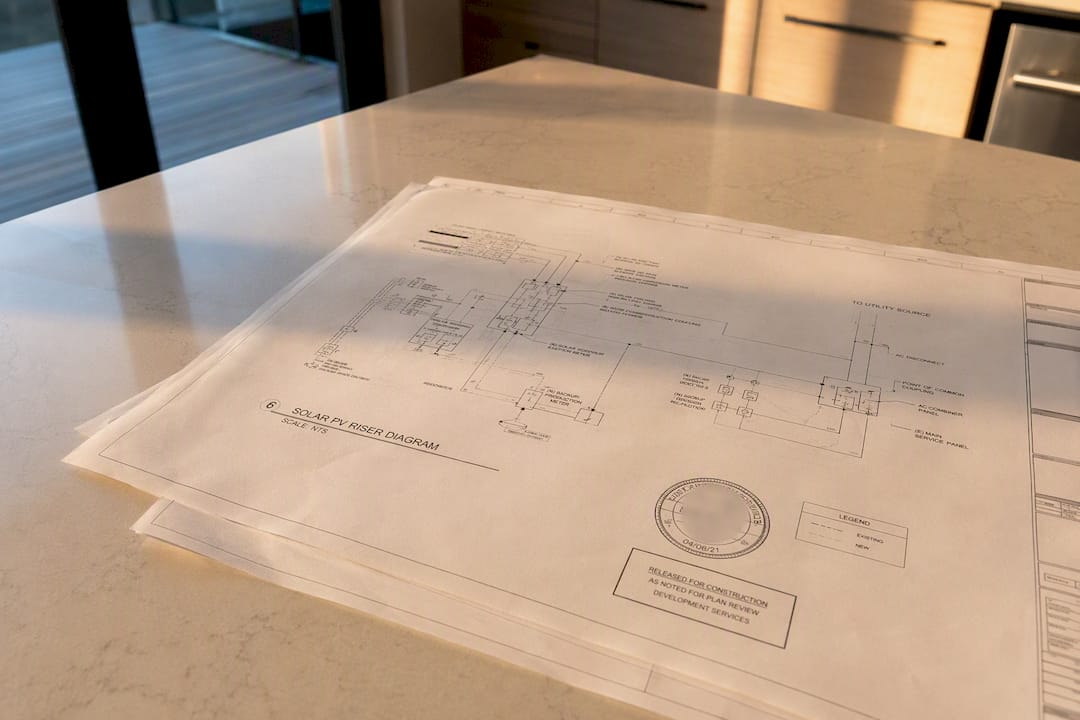
3. Get your plans sealed, and make sure the electrical design actually follows NEC 690. Sealed structural plans (from a licensed engineer or an approved certification path) and an electrical plan set that includes a proper PV riser diagram are non-negotiable. The riser diagram needs to show rapid shutdown compliance, arc-fault and ground-fault protection, and correct conductor sizing under National Electrical Code Article 690, which governs solar photovoltaic systems specifically. A generic electrical diagram borrowed from a different job will not pass.
4. Submit through the right portal, pay the upfront fees, and track your process number. County projects go through Miami-Dade’s Concurrent Plans Processing system, which routes a complete package to structural, electrical, and zoning reviewers at the same time instead of one after another. That concurrency is the whole point of CPP: it can cut weeks off a process that used to move department to department in sequence. City of Miami projects go through the city’s ePlan system instead, though the document expectations are nearly identical.
Once submitted, you’ll get a process number. Use it to check status online rather than calling in blind. If a reviewer kicks back a correction, read the comment carefully. It usually references a specific sheet or code section, and re-uploading the whole package instead of just the corrected sheet is a common way to add a week to your own timeline.
5. Pay final fees and print the permit card. A permit is not active just because it was approved on paper. You pay the balance of fees, then print or receive the permit card, which needs to be posted at the job site before any inspection is scheduled. Contractors who’ve been through this a dozen times still get tripped up by this last step, because “approved” and “issued” are not the same status in the county’s system.
For homeowners filling out the initial application themselves, a step-by-step application guide built specifically for Miami-Dade’s forms is worth reading before you start, since the form fields don’t always match what a general contractor’s application looks like elsewhere in Florida.
What Documents Do You Need for a Solar Permit in Miami-Dade?
Reviewers reject incomplete packages fast, and a missing signature or a mislabeled roof plan is enough to send the whole submission back. Here’s what needs to be in the package before you upload anything:
- Signed and notarized Building Permit Application (the yellow form), with owner and contractor information matching the folio record exactly.
- Electrical Fee Sheet (the gold form) with Category 34 selected and the Solar Mounted System fee code entered correctly, since the wrong code is one of the most common triggers for an administrative reject.
- Digitally signed and sealed structural plans, not scanned images of a wet-ink signature, which most portals now reject outright.
- A roof plan showing wind uplift data per ASCE-7, the roof zone breakdown, and the roof-deck type, since the Solar Systems Guidelines require this level of specificity rather than a generic layout.
- A PV riser diagram compliant with NEC 690, covering rapid shutdown, disconnect location, and grounding.
- The owner’s solar disclosure form, acknowledging the scope and structural implications of the installation.
- Product approvals or FSEC certification for the mounting hardware and racking system, where the manufacturer’s approval doesn’t already cover the specific roof type.
- Current roof-assembly documentation. If the roof deck condition is unknown, unclear, or older than its expected service life, expect the reviewer to ask for it before continuing.
That last point trips up more applicants than any other on this list. If you’re re-roofing at the same time as installing solar, or the existing roof needs work to support the new mounting system, a separate roofing permit is usually required alongside the solar electrical permit. Miami’s city guidance draws a specific distinction here: residential projects generally don’t need a standalone roofing permit if the existing roof is sound, but commercial projects do in nearly every case. Confirming which category your job falls into before submission avoids a mid-review surprise.
A document checklist built around Miami-Dade’s specific form requirements helps homeowners and smaller contracting crews avoid the “I thought that was included” problem that shows up when plans come from a designer who hasn’t worked in this county before.
Why Do HVHZ Rules Matter for Solar Permits?
Miami-Dade sits inside Florida’s High Velocity Hurricane Zone, and that single fact drives more permit rejections than any other structural issue on a solar job. HVHZ construction standards under the Florida Building Code demand wind-uplift calculations tied to ASCE-7 pressure data, specific to the roof zone (edge, corner, or field) where each panel row sits. A generic uplift number pulled from a manufacturer’s spec sheet without adjusting for your specific roof zone and exposure category is one of the fastest ways to get a structural comment back from a plan reviewer.
The fix that saves the most review time: use the county’s pre-approved flashing details instead of a custom flashing design. When your installer references an already-approved detail, the reviewer isn’t evaluating a novel penetration method from scratch, and that alone can shave real time off a structural review cycle. If your racking system uses a flashing approach that isn’t on the pre-approved list, you’ll need an equivalent product approval or an engineer’s stamp specific to that detail.
- Wind-uplift and pressure calculations must reference ASCE-7 and match the actual roof zone layout, not a generic average.
- Pre-approved flashing details speed review; custom details need separate product approval documentation.
- FSEC certification covers many standard racking and mounting products; anything outside that certification typically needs a Florida-licensed engineer’s stamp instead.
- Required labeling includes rapid shutdown signage, AC and DC disconnect labels, and arc-fault protection notices, all specified under NEC 690.
- Grounding and bonding details need to appear explicitly on the riser diagram, not just implied by the equipment list.
Pro Tip: If your racking manufacturer offers a Florida Product Approval number, put it directly on the plan set cover sheet. Reviewers look for it first, and its absence is one of the quickest ways to trigger a request for additional engineering.
Whether you need FSEC certification or a PE stamp usually depends on whether your exact equipment and roof combination already has an approved path. Standard residential installations on conventional shingle or tile roofs often clear through FSEC-certified products. Unusual roof geometries, flat roofs, or non-standard mounting depths tend to need a licensed engineer’s direct review instead.
How Do You Submit Solar Plans Electronically in Miami-Dade?
Paper submissions still exist in theory, but nearly every solar permit in Miami-Dade now moves through an electronic portal, and the file requirements are stricter than most designers expect.
- Create an account on the correct portal. County projects use the Concurrent Plans Processing system, which sends your complete package to structural, electrical, and zoning review simultaneously rather than in sequence. City of Miami projects use the ePlan system instead, so confirm jurisdiction before creating an account in the wrong place.
- Upload digitally signed and sealed PDFs, never scanned images. A scanned wet signature reads as a flat image to the portal’s validation software and gets flagged automatically before a human reviewer ever opens the file. This single formatting mistake is behind a large share of instant rejections. A guide to sealed-plan formatting covers the specific file types and digital signature standards the portal expects.
- Book a MeetQ consultation if you’re unsure about a code requirement. The county offers scheduled consult slots specifically so applicants can ask a reviewer a direct question before submitting, rather than guessing and burning a review cycle on a mistake that a five-minute conversation would have caught.
- Track your process number and respond to corrections within the file, not with a new one. When a correction comment comes back, upload the revised sheet under the same process number. Starting a new application because you’re not sure how to respond just resets your position in the queue.
Avoid converting your file format at the last minute to meet a file-size limit. A rushed conversion from a CAD export to PDF often strips the digital seal, and that alone can send an otherwise complete package back for resubmission.
Common Reasons Solar Permits Get Delayed in Miami-Dade
Reviewing hundreds of permit packages surfaces the same handful of mistakes over and over, and almost none of them are about the solar design itself. They’re administrative.
A common reject: the wrong fee code on the Electrical Fee Sheet. The county’s Solar PV permit page directs applicants using its prescribed solar mounted system to enter fee code G137 and include the pre-approved flashing detail; a generic electrical code leads to avoidable corrections. Close behind it: rasterized or scanned PDFs that fail the digital seal check, missing wind-uplift calculations tied to the specific roof zone, an omitted owner’s solar disclosure form, and unclear roof-assembly status when the age or condition of the deck isn’t documented.
Here’s the pre-submission checklist that catches most of these before the county ever sees the package:
- Confirm the Electrical Fee Sheet lists the correct Category 34 and Solar Mounted System fee code, not a generic electrical permit code.
- Request electronically sealed CAD or PDF files directly from your structural and electrical designers. Never accept a printed-and-scanned version.
- Include a pre-approved flashing detail reference on the roof plan, or attach the specific product approval if your racking system uses a custom detail.
- Verify contractor licensing status through the Florida DBPR lookup before the application is filed, not after a reviewer questions it.
A permit-readiness review that checks digital seal compatibility, fee code accuracy, FSEC or PE certification presence, and required labeling before you submit tends to materially cut the number of correction cycles a package goes through, since most of these issues are catchable before a human reviewer ever opens the file.
Pro Tip: Print your Electrical Fee Sheet and building application side by side and compare the owner name, address, and folio number character for character. Mismatches between the two forms are a surprisingly common, entirely avoidable reject.
What Inspections Happen After the Permit Is Issued?
An approved plan is not the same thing as an active permit, and the gap between those two statuses catches people off guard constantly.
Inspections generally run in this order: rough electrical (if applicable to your mounting sequence), roof/installation inspection covering the racking and flashing, and a final inspection confirming the completed electrical connections, labeling, and rapid shutdown function. You request inspections online through the county or city portal, or by phone through the Permitting and Inspection Center, and same-day requests aren’t guaranteed, so schedule ahead of any deadline you’re working against.
- The permit card must be printed and posted at the job site before the first inspection is scheduled. Skipping this step is a common reason for an inspector to turn away on arrival.
- All final fees must be paid in full before the permit is legally considered issued, not just approved.
- Keep a full approved plan set on-site during every inspection, since inspectors reference it directly and won’t proceed without it.
- Utility interconnection, or “permission to operate,” is a separate process entirely. Contact your local utility after final inspection to start that step, since it doesn’t happen automatically.
What Are Typical Timelines and Fees for a Miami-Dade Solar Permit?
A complete, correctly formatted application moves through concurrent review noticeably faster than one that triggers even a single correction cycle, since each round of corrections adds its own wait time back into the queue rather than picking up where the last review left off.
Budget for these fee categories beyond the base electrical permit charge:
- Upfront plan review fees, due at submission regardless of outcome.
- Re-review fees, charged each time a correction cycle requires the reviewer to look at the package again.
- Conversion fees, applied when paper documents have to be digitized by county staff instead of submitted correctly the first time.
- Additional engineering or product-approval fees, when your equipment falls outside standard FSEC-certified options.
The math is simple: every fixable, avoidable correction cycle costs both time and a re-review fee. Re-roofing at the same time as installing solar, or running a commercial-scale system alongside residential permitting, tends to stretch timelines further because it pulls in additional review departments.
Are There Zoning Restrictions on Solar Panels in Miami-Dade?
Miami-Dade’s zoning code treats solar installations as accessory structures, and a 2023 ordinance update clarified how that classification works in practice. Because solar arrays don’t add habitable interior space, they typically qualify for height exemptions and setback flexibility that a standard addition wouldn’t get. That distinction matters at the plan-review stage: if your plan set clearly labels the array as a non-habitable accessory structure, zoning review tends to move faster than when the classification is ambiguous or missing from the drawings.
Ground-mounted systems face closer zoning scrutiny than roof-mounted ones, particularly around setback lines from property boundaries and any restrictions tied to flood zone classifications on the parcel. Historic district properties and some waterfront parcels carry additional design review layers that a standard suburban roof-mount installation never encounters, so checking your property’s specific zoning overlay before finalizing a design saves a potential redesign later.
Homeowners’ associations add another layer entirely outside the county’s authority. Florida law limits how much an HOA can restrict solar installations, but HOAs can still regulate placement and screening within legal bounds, so reviewing your association’s architectural guidelines alongside the county’s zoning requirements avoids a conflict that shows up after the permit is already issued.
What Compliance and Maintenance Rules Apply After the Permit Closes?
Getting the permit closed out with a passed final inspection isn’t the end of your obligations. It’s the start of an ongoing compliance relationship with the system you just installed.
Required labeling installed during construction, rapid shutdown signage, disconnect labels, and arc-fault notices, needs to stay legible and in place for the life of the system. If a label fades, is removed during later roof work, or gets covered by later renovations, that’s a code violation waiting to surface at your next unrelated inspection or at resale.
Any modification to the system after final inspection, adding panels, changing inverters, or altering the mounting layout, generally requires its own permit rather than being covered under the original approval. Homeowners frequently assume a straightforward battery-storage addition or panel swap falls under routine maintenance. It usually doesn’t, and skipping that follow-up permit creates a real problem when the property sells and a buyer’s inspector flags unpermitted work.
Insurance carriers and mortgage lenders increasingly ask for the closed permit record during underwriting or claims review, so keeping a copy of the final inspection approval and the closed permit card somewhere accessible, not just in the county’s database, saves a scramble later. Roofing work performed around the array in future years also needs to account for the existing solar mounting system in its own permit application, since removing and reinstalling panels for roof repairs is its own documented scope of work under county rules.
Common Problems in Miami-Dade Solar Permit Packages
The same three problems show up in package after package: wrong fee codes, missing wind-uplift calculations tied to the actual roof zone, and roof-assembly status left undocumented. Fix those three before anything else, because they’re what stall a review before a human even reaches the design itself.
What surprises most first-time applicants is how little the actual solar equipment matters to a rejection. Reviewers aren’t scrutinizing panel efficiency or inverter brand. They’re checking whether the paperwork proves the roof can hold what you’re bolting to it, and whether the forms match each other exactly. Contractors who’ve filed dozens of these packages internalize that; homeowners filing their first one usually don’t, and it costs them a review cycle they didn’t need to lose.
Cut Rejection Risk Before You Submit to Miami-Dade
Miamipermitai gives Miami-Dade homeowners and contractors something the county’s own portal doesn’t: a readiness check before you spend a review cycle finding out what’s wrong. The platform reads your uploaded plan set and forms against Miami-Dade’s actual requirements, including Miami 21 zoning, FEMA flood zone data, and Florida DBPR licensing records, then flags the missing documents, mismatched forms, and plan inconsistencies most likely to trigger a correction.
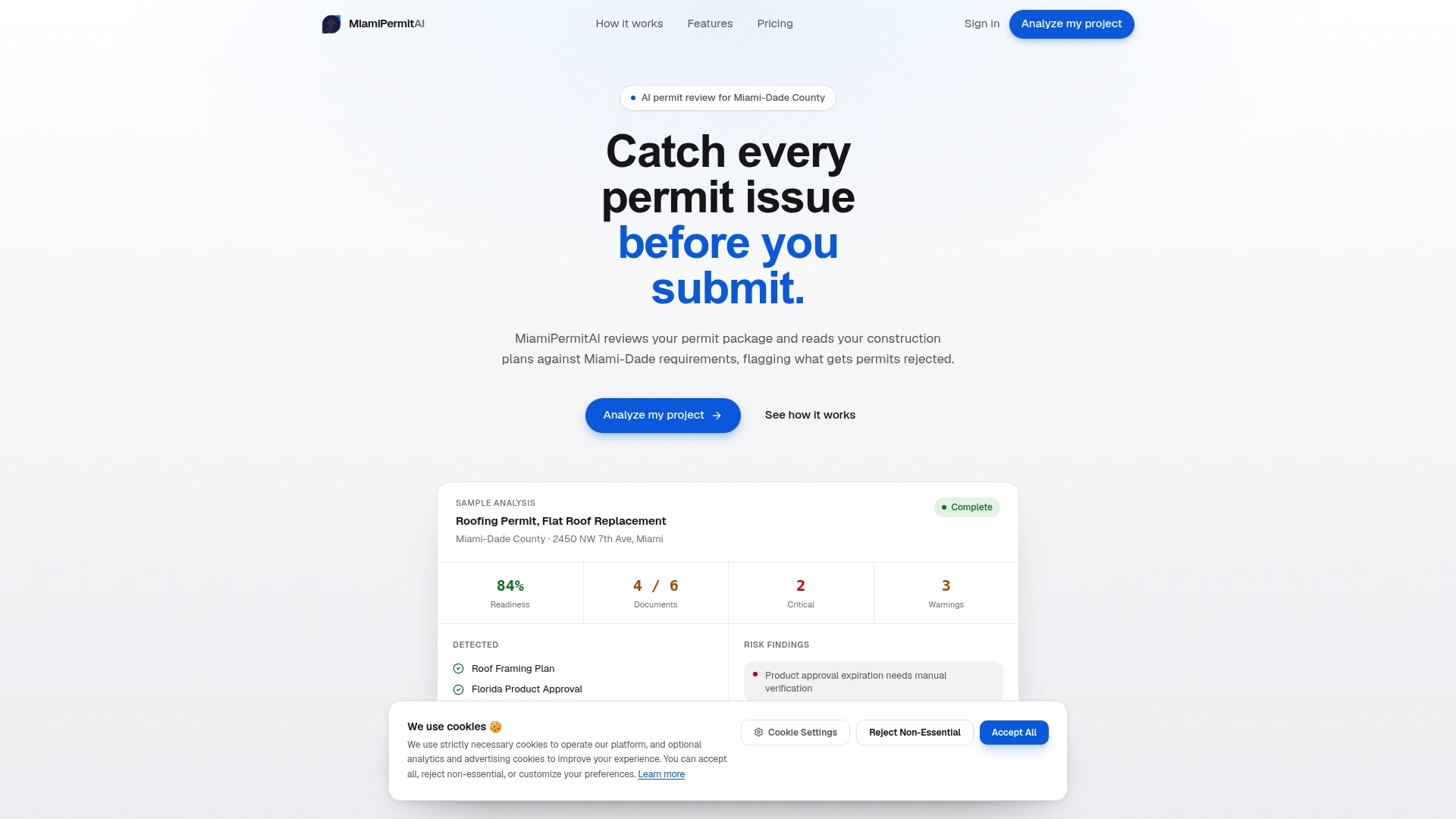
You get a readiness score and a plain-language fix list before you ever open a county portal account. Homeowners filing a single solar permit can run a one-time readiness review; contractors handling multiple jobs a month can subscribe for ongoing analyses instead of paying per project. Once you submit to the county yourself, Miamipermitai keeps tracking the permit through public records and emails you status updates, so you’re not refreshing a portal page every few days wondering where things stand.
If your plan set, fee sheet, and disclosures are ready to go, check your permit package before you upload it to the county and see exactly what a reviewer would flag first.
Official Resources for Miami-Dade Solar Permits
- Miami-Dade County solar PV permit portal for applications and process tracking.
- City of Miami solar panel permit page for municipal requirements.
- Miami-Dade PV permitting workshop presentation covering submittal items and inspections.
- Solar Systems Guidelines PDF for roof plan and structural documentation standards.
- Federal solar tax credit guidance from the U.S. Department of Energy.
Sources
- Miami-Dade County Permit - Solar Photovoltaic (PV) Systems
- Get a Permit to Install Solar Panels - City of Miami
- Solar Photovoltaic (PV) permitting and plan submittal requirements (Miami-Dade presentation)
- Solar systems permit document guideline (Miami-Dade)
Recommended
Is your permit package ready?
Run an AI readiness check against Miami-Dade requirements before you submit.
Start your first projectThis article is general guidance and not legal, engineering, or official county advice. Always verify requirements with Miami-Dade County before submitting a permit.